Android File Transfer alternative for Mac (2026)
Google discontinued Android File Transfer in 2024. Here is what actually works on a Mac today — the built-in way, the free way, and RollFerry.
Updated 19 September 2026
Short answer: Android File Transfer was discontinued by Google in 2024 and does not work reliably on current macOS. For photos and videos, the two honest options are Image Capture with your phone in PTP mode (free, built in, limited) or RollFerry (paid, made for exactly this). For general file management, OpenMTP is free and open source.
What happened to Android File Transfer
Android File Transfer was Google’s cable tool for moving files between an Android phone and a Mac. It hadn’t had a meaningful update for years, broke on successive macOS releases, and Google quietly removed the download in 2024. macOS has never had its own support for the protocol Android uses over USB (MTP), so when Google’s tool went, there was nothing left in the box.
If you’ve searched for it recently, you’ll have found download mirrors of the last version. It may open on your Mac; it may also hang on “Connecting”, show an empty window, or fail after a few files. Nobody maintains it.
Option 1 — Image Capture, with the phone in PTP mode (free)
This is the method Apple never advertises. Every Mac ships with Image Capture (in Applications → Utilities), and it speaks PTP — the camera protocol. Android phones can pretend to be a camera.
- Plug in the phone. Pull down the USB notification and choose Transferring images (some phones call it PTP or Photo transfer), not File transfer.
- Open Image Capture. Your phone appears in the sidebar.
- Pick a destination folder at the bottom, select photos, and click Import.
What works: it’s free, already installed, and copies photos and videos from your camera roll.
What doesn’t: PTP only exposes the camera folder, so WhatsApp media, screenshots and downloads are invisible. Image Capture shows everything as one flat list with no months; on a phone with a few thousand photos, finding “just August” means scrolling. It doesn’t verify copies, doesn’t resume if the cable comes out, and the “Delete after import” checkbox deletes without checking the copy is intact. Many people also find that Photos.app opens itself and grabs the phone first.
If you have a few hundred camera photos and no WhatsApp habit, this is enough.
Option 2 — OpenMTP (free, open source)
OpenMTP is a free file manager for Android over MTP. It shows the phone’s folders on one side and your Mac on the other, and you drag things across.
What works: free, actively maintained, sees every folder on the phone including WhatsApp, and handles large files reasonably.
What doesn’t: it’s a file manager, not a photo tool. You navigate DCIM/Camera and WhatsApp/Media/WhatsApp Images by hand, see filenames rather than months, and there’s no notion of “what’s new since last time” — you work out yourself which of the 4,000 files you’ve already copied. No verification, no safe delete. MTP quirks on some phones (particularly Samsung and Xiaomi) can mean a stalled transfer needs a replug.
If you’re comfortable with folders and want a general-purpose tool, use it.
Option 3 — RollFerry (paid, made for photos)
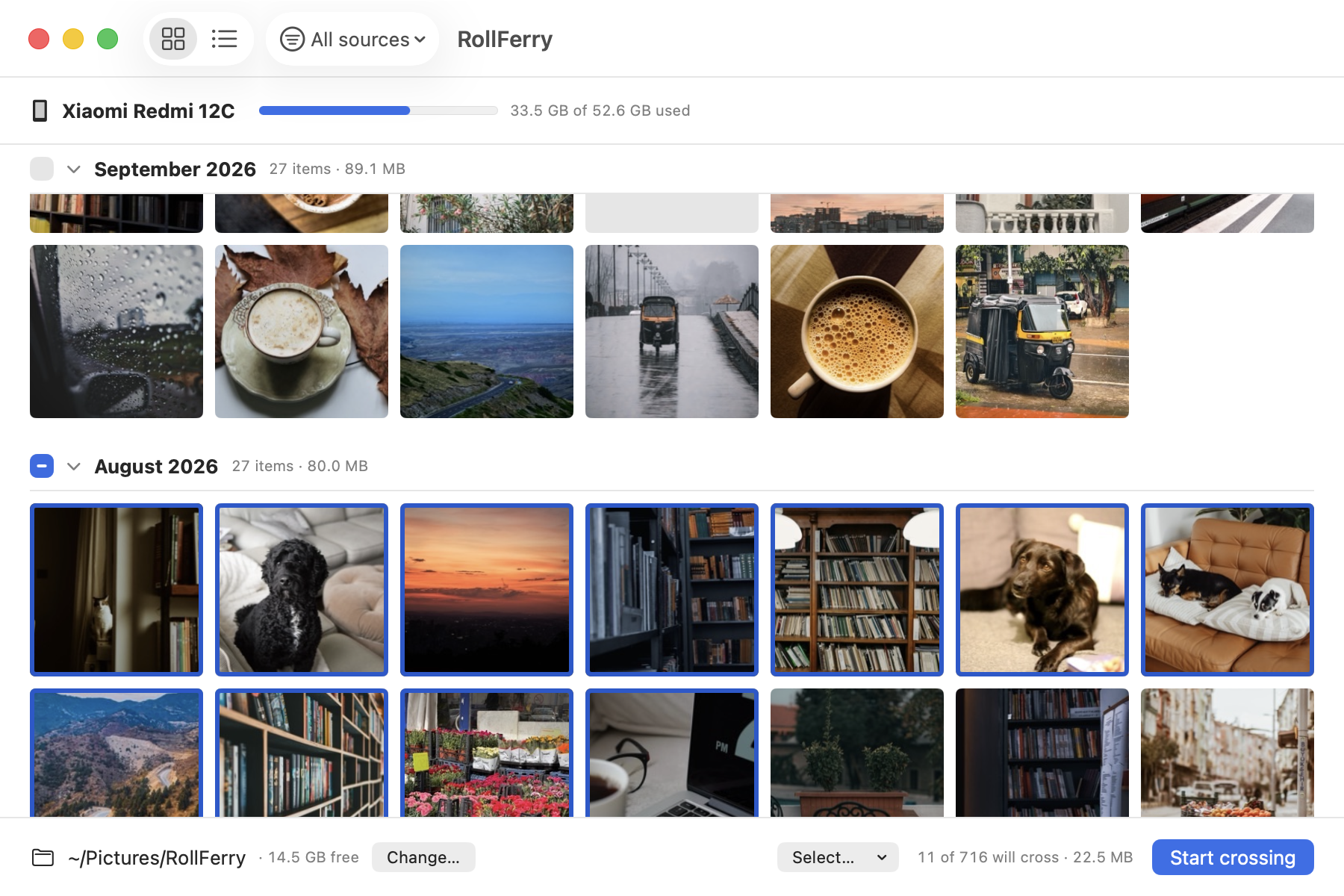
RollFerry is a Mac app that does one thing: gets photos and videos off an Android phone and onto your Mac or an external drive, over a cable, and only deletes from the phone once each copy is verified.
- Plug in the phone in File transfer mode. RollFerry reads it — about five seconds for 700 photos.
- It shows only what isn’t on your Mac yet, by month, with thumbnails. Filter to Camera, Screenshots or WhatsApp. Pick a month, a range, or everything.
- Press Start crossing. Each file is copied, then checked byte for byte. Unplug halfway and it resumes where it stopped.
- Optionally, free the space: RollFerry offers to delete only the photos it has verified on your Mac.
What works: months and thumbnails instead of filenames; sees WhatsApp, screenshots and downloads; remembers what has already landed so the second plug-in shows only the new items; verifies every copy; resumes after an unplug; works offline with no account. It’s a native Mac app, sandboxed, and sends nothing but your license key.
What doesn’t: it’s photos and videos only — not a general file manager, not contacts or SMS. It’s $29, once. iPhone support is coming; Wi-Fi transfer isn’t planned.
Which one should you use?
- Camera photos only, few hundred, no rush: Image Capture in PTP mode.
- You want to move arbitrary files and folders: OpenMTP.
- Phone is full, you have WhatsApp media, or you want it verified before deleting: RollFerry.
One thing to check first, whatever you use
Android defaults to charging only every time you plug in. Nothing on the Mac will see the phone until you pull down the USB notification and choose File transfer (or Transferring images for Image Capture). Nine times out of ten, “my Mac doesn’t see my phone” is this.